Using the Combat Simulator
Travian provide a very basic
combat simulator, that can be used after scouting an “Enemy” village. So first
we need to look at scouting.
Choose the village you want to scout, click on “Send troops” and enter the
number of scouts you want to send, then click on either “Attack Normal” or “Attack
Raid” – it makes no difference for scouts – then click on “OK”
You will
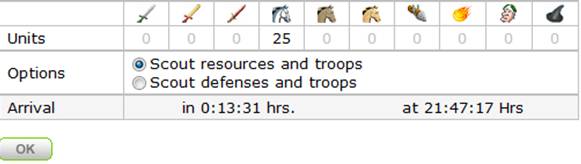
then see the following screen
Selecting
the 1st option – you will get a report of how many (and what types
of) troops are in the village and how many of each resource are in the village.
Remember that crannies can reduce the amount of resources that you can steal.
Selecting
the second option will report on the troops and will also show you the level of
any wall and the level of any Palace or Residence.
Having all this
information will help you decide if it is worth attacking or not.
Once we have
the info we then need to look at “Will we win the fight?”
We can use
the Travian combat simulator that is available by clicking on the rally point –
but there is a much better one available at :- http://travian.kirilloid.ru/warsim.php
The first
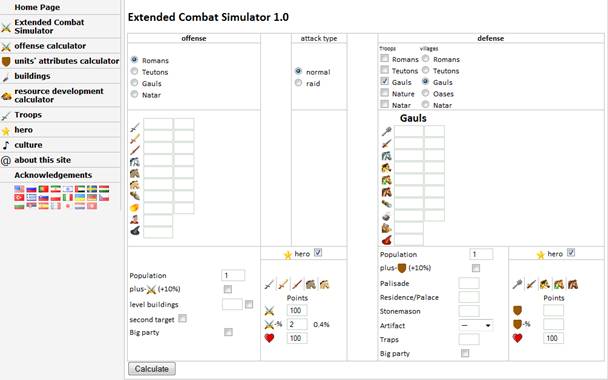
thing we need to do is to enter the troop types for the attacker (Us) and the
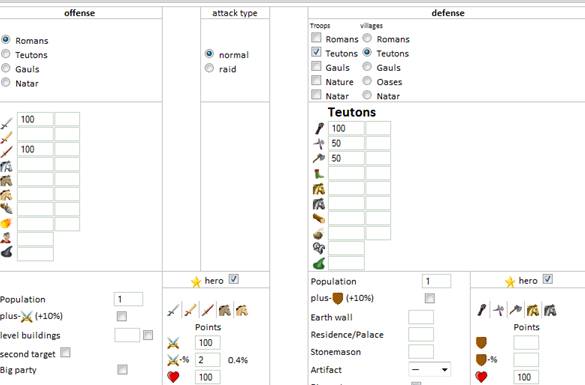
defender, so for this example I am going to be a Roman, with 100 Legionnaires
and 100 Imperians. I am going to attack a Teuton who has 100 macemen , 50
spearmen and 50 Axemen (I have seen that from my scoutings).
So I enter
the details in the boxes provided, making sure that I have selected the correct
tribe. (Note that for the defenders village you can select multiple troop types
– if they have reinforcements in their village – but it is essential that you
set the “Village” type correctly)
We also need to select if we are sending a Normal attack or a raid – A normal
attack is where troops will fight to the death – one side will lose all troops,
in a raid – the troops will fight their way into the warehouse, steal what they
can then fight their way out again, so some troops from either side will
usually survive.
The next
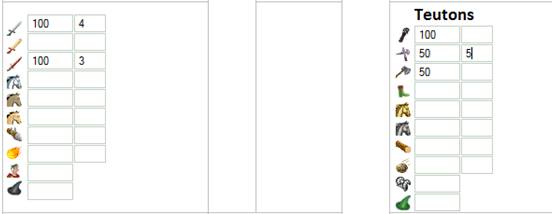
stage is to enter my troop upgrades in the Blacksmith, my blacksmith is
currently level 5 – but the Legionnaires are only so far at level 4 and the
Imperians at level 3, so I enter that in the box after the troops
For the
defending troops we have to guess on their level in the Armoury, I usually
compare the players population to mine and make a rough guess – based on my own
level – so for someone with a similar population, I would guess close to the
same upgrade levels as me, but Macemen and Axemen are both Offence troops so it
is unlikely they would be upgraded in the armoury, so I will enter “5” for the
spearmen only
We now need
to enter the details in the lower part of the screen. The first thing is
population, I always do this twice, the first time with the population of the
attacking and defending village, the second with the total population of
the attacking and defending player, you will notice that the resulting figures
are slightly different, but we do not know which of them is the most accurate,
so it is worth looking at both before making a decision as to whether we should
attack.
The “Plus”
bonuses are no longer available so we can ignore those. “Level buildings” and “Second
target” are for catapults (and we have to guess the level of their buildings
anyway) so can both be left unticked, but if you are holding a Grand
Celebration in your village (if you have a town hall) you can tick that box.
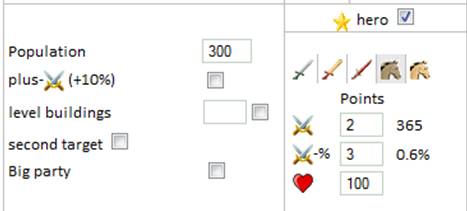
If you are
sending you hero on the attack you should tick the hero box, and then the
picture of the troop type of your hero. My Hero is an Equites Imperatoris,
so I will click on the first horse.
I then look in my hero mansion at the table to
see how I have allocated points to the hero.
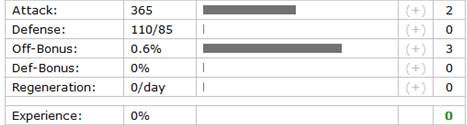
You can see that my hero currently has 2 points
on Attack and 3 points on Off –bonus, so I enter those numbers in the boxes
(The numbers outside the boxes will appear automatically – but should match the
numbers in the second column above). Finally I enter my Heroes health in the
bottom box.
Now I need to do the same for any defending hero,
again we need to guess on the levels – but we can use some information to help
us with the guess.
Go to the statistics page on Travian, (Click on
the pie chart at the top of any page) then click on “Heroes”, type in the name
of the player you are attacking to see their hero.
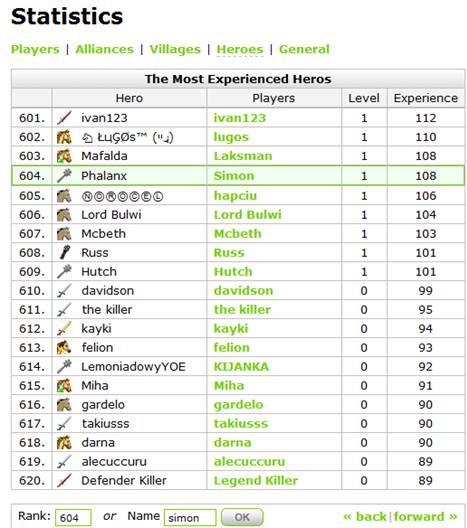
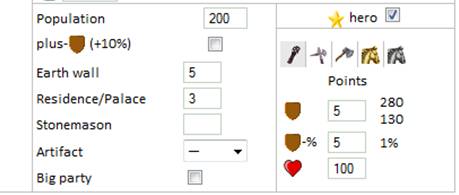
We can then identify the type of hero and the
number points they have available to spend (A level 0 hero has 5 points, level
1, 10 points etc) so looking at “Russ” he has a Maceman hero with 10 points. We
can take a “Worst case scenario” where all points have been spent on Def and
Def Bonus, so we can put 5 points on each of these.
If they have an offensive troop type as a hero, it likely they would have spent
the points on Offence and Off bonus so we could reduce the numbers slightly,
but I like to play safe!
My scouting has told me that their wall is level 5 and their residence is level
3, so I enter the details in the boxes.
Now all that
is left to do is to hit the “Calculate” button and see how we will do in the
battle.
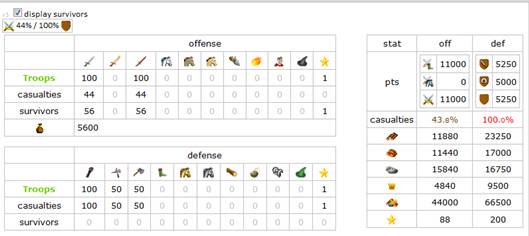
The results
show that I will lose 44 of each type of my troops, but the defender will lose
all theirs. To the right you will see statistics, which can help you decide if
the resources in the village are worth the troops losses – it will take me
11880 wood, 11440 clay, 15840 Iron and 4840 crop to rebuild my troops, so if I
am going to steal more than that, it is a worthwhile exercise, however it
should be remembered that once you have killed their troops you can keep
attacking for more resources, and if they have no troops then they can’t attack
you to steal your resources.
You can see from the above pictures that it is necessary to change screens a
few times, so it is worth collecting all the information before you start, or
opening the combat simulator in a new tab or window, so you can switch between
screens without losing the information you have already entered.